
Happy Horse 1.1 का उपयोग करना सबसे आसान तब होता है जब आप सही generator page से शुरुआत करते हैं। text-to-video का उपयोग तब करें जब विचार केवल prompt के रूप में मौजूद हो, image-to-video तब जब आपके पास पहले से एक मजबूत first frame हो, और reference-to-video तब जब pure prompt freedom से अधिक character, product, या style consistency महत्वपूर्ण हो।
हमने इस guide में screenshots live TryHappyHorseAI generator से 24 जून, 2026 को लिए थे, जब public pages पूरी तरह load हो चुके थे। अगर आप पहले broader release overview देखना चाहते हैं, तो Happy Horse 1.1 अब लाइव है: क्या बदला और इसका उपयोग कैसे करें पढ़ें। अगर आप dedicated page चुनने से पहले सभी creation modes की तुलना करना चाहते हैं, तो Happy Horse AI video generator hub से भी शुरुआत कर सकते हैं। यह article practical companion है: कौन-सा page खोलना है, किन settings को छूना है, prompt कैसे लिखना है, और किन examples का अध्ययन करना है।
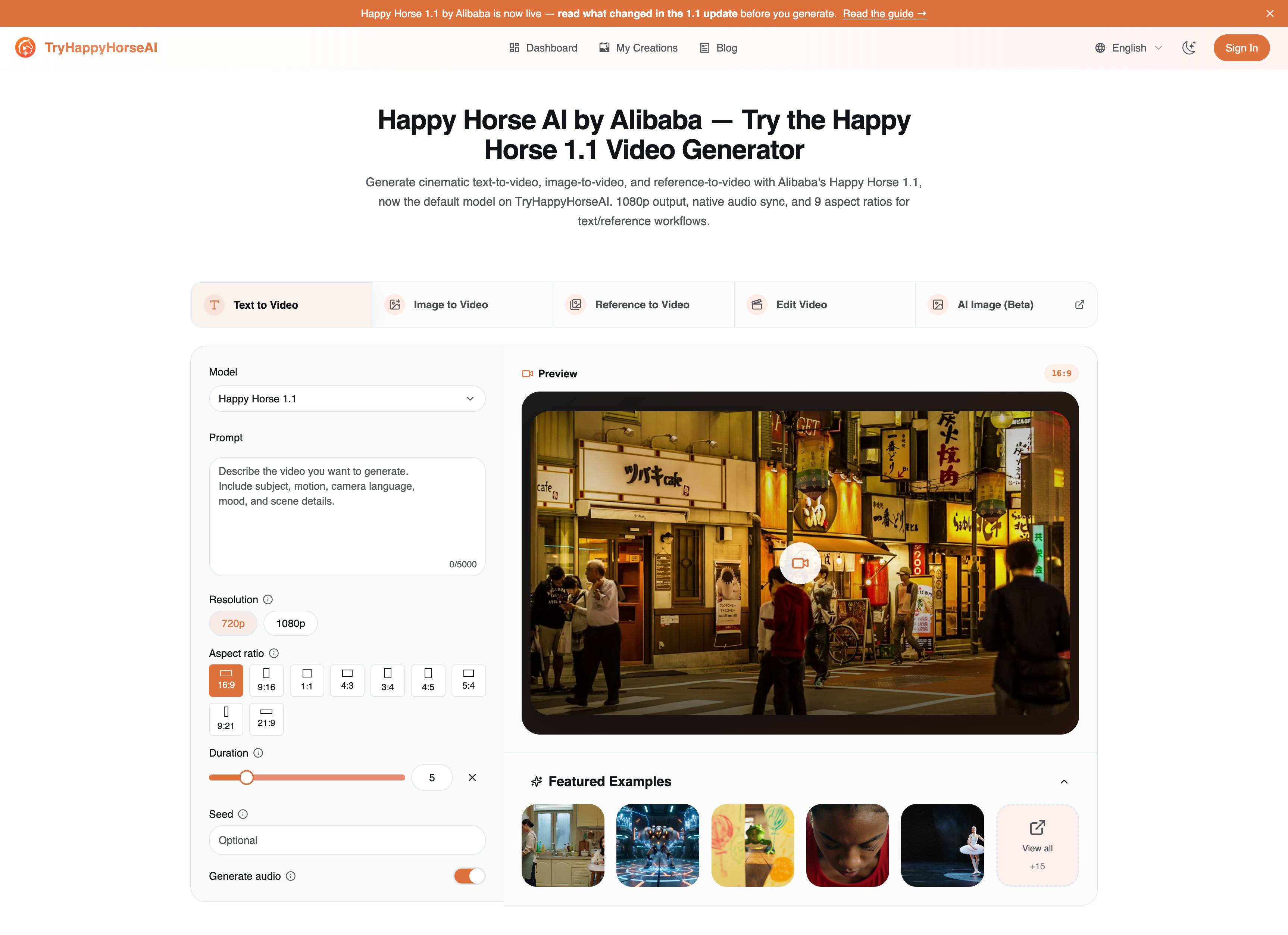
तेज़ Workflow मैप
तीनों Happy Horse 1.1 creation pages अलग-अलग होने का एक कारण है। ये सभी video generate करते हैं, लेकिन हर एक अलग starting asset की अपेक्षा करता है।
| Page | Start with | Best for | Open it |
|---|---|---|---|
| Text to Video | एक लिखित दृश्य | Concept clips, cinematic tests, social ideas, ad variants | Text to Video |
| Image to Video | एक first-frame image | Product motion, portraits, posters, visual loops | Image to Video |
| Reference to Video | अधिकतम 9 reference images | Character identity, wardrobe, product details, repeated campaign style | Reference to Video |
जिस गलती से बचना चाहिए, वह है गलत mode की भरपाई करने के लिए लंबा prompt लिखना। अगर आपके पास पहले से exact product photo है, तो image-to-video आमतौर पर text-to-video से बेहतर रहेगा। अगर आपको किसी नए scene में वही person या outfit बनाए रखना है, तो reference-to-video आमतौर पर दोनों से बेहतर रहेगा।
1. Text to Video: शुरुआत से Scene बनाएं
Text to Video का उपयोग तब करें जब scene अभी भी flexible हो। ideas explore करने के लिए यह सबसे तेज़ mode है क्योंकि पूरा shot prompt पर निर्भर करता है: subject, action, camera, environment, lighting, mood, और audio direction।
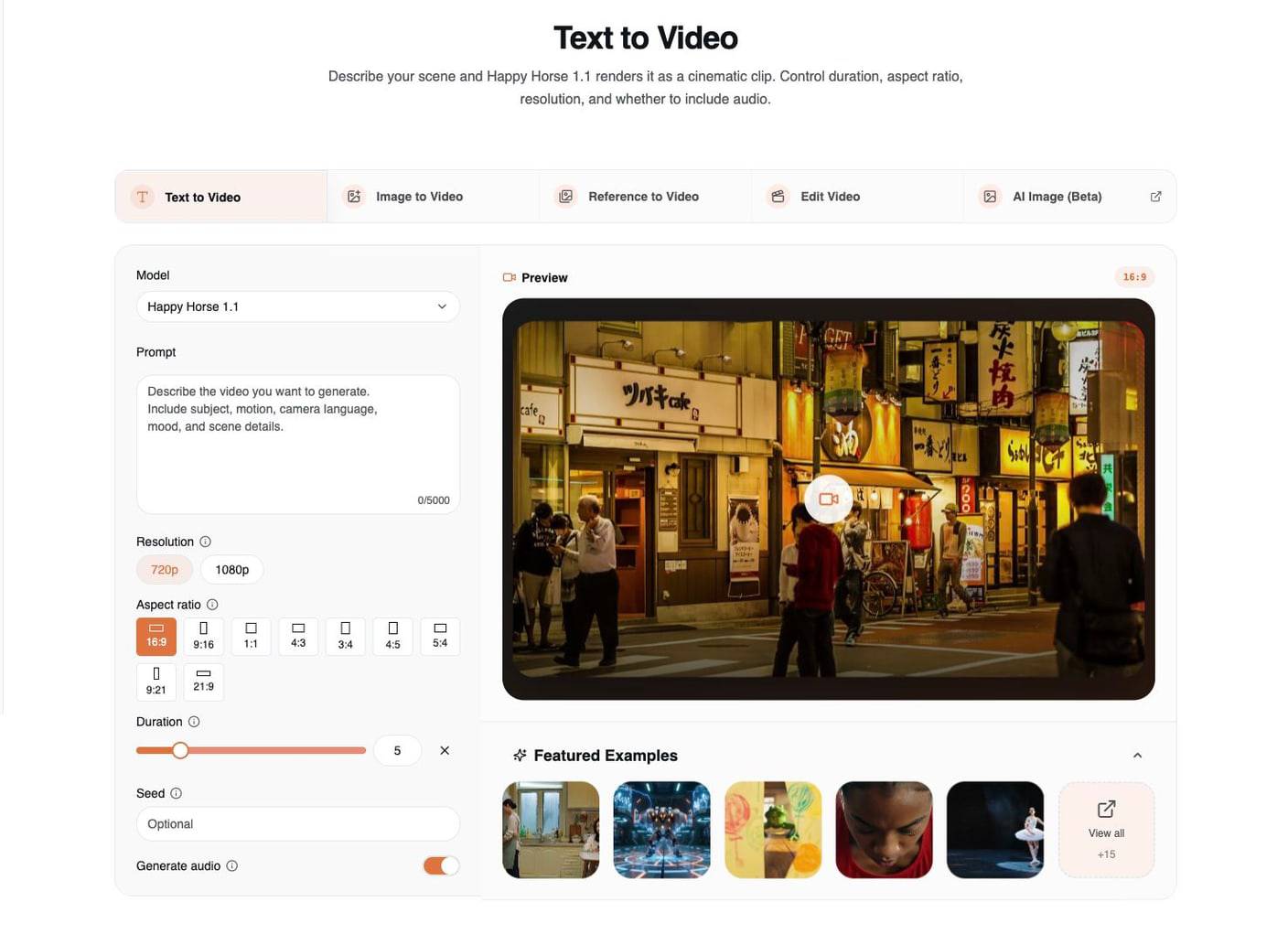
इस page पर सबसे महत्वपूर्ण controls हैं:
| Control | Practical use |
|---|---|
| Model | नए T2V work के लिए Happy Horse 1.1 चुनें। |
| Prompt | visible scene, camera movement, mood, और audio का वर्णन करें। |
| Resolution | तेज़ iteration के लिए 720p और बेहतर final renders के लिए 1080p का उपयोग करें। |
| Aspect ratio | generation से पहले target format चुनें: 16:9, 9:16, 1:1, 4:3, 3:4, 4:5, 5:4, 9:21, या 21:9। |
| Duration | 3 से 15 seconds के बीच short clip length चुनें। |
| Seed | जब आपको अधिक repeatable variation path चाहिए हो, तब seed को reuse करें। |
| Generate audio | scene को dialogue, ambience, या action sound से लाभ हो तो इसे on रखें। |
सबसे साफ text-to-video prompt formula है:
Subject + action + environment + camera movement + lighting + mood + audio cue + format
उदाहरण:
A professional ballet dancer performs a powerful grand jeté across a dimly lit stage, arms extended, tutu flowing in slow motion. The camera tracks from a low side angle, warm spotlights create long shadows on the floor, cinematic stage lighting, subtle fabric movement, 10 seconds, 16:9.
मौजूदा featured T2V examples उपयोगी हैं क्योंकि वे अलग-अलग तरह के control दिखाते हैं: multi-person dialogue, fight choreography, one-take movement, sports motion, और ballet। इनका अध्ययन करते समय subject से कम और structure से अधिक सीखें: बेहतर examples यह बताते हैं कि scene में कौन है, camera कैसे move करता है, समय के साथ क्या बदलता है, और audio को क्या करना चाहिए।
अध्ययन करने योग्य Text-to-video examples
ballet sample एक साफ prompt-first example है क्योंकि prompt एक single subject, stage environment, camera style, और clear motion vocabulary देता है।
multi-person interaction sample dialogue-style prompting के लिए उपयोगी है। ध्यान दें कि prompt पूरे clip को एक generic instruction की तरह मानने के बजाय scene, subjects, motion, और audio beats को अलग करता है।
2. Image to Video: First Frame को Animate करें
Image to Video का उपयोग तब करें जब आपके पास पहले से वह visual frame हो जो आप चाहते हैं। uploaded image काम का बड़ा हिस्सा कर देती है, इसलिए prompt को shot को फिर से गढ़ने के बजाय motion को guide करना चाहिए।
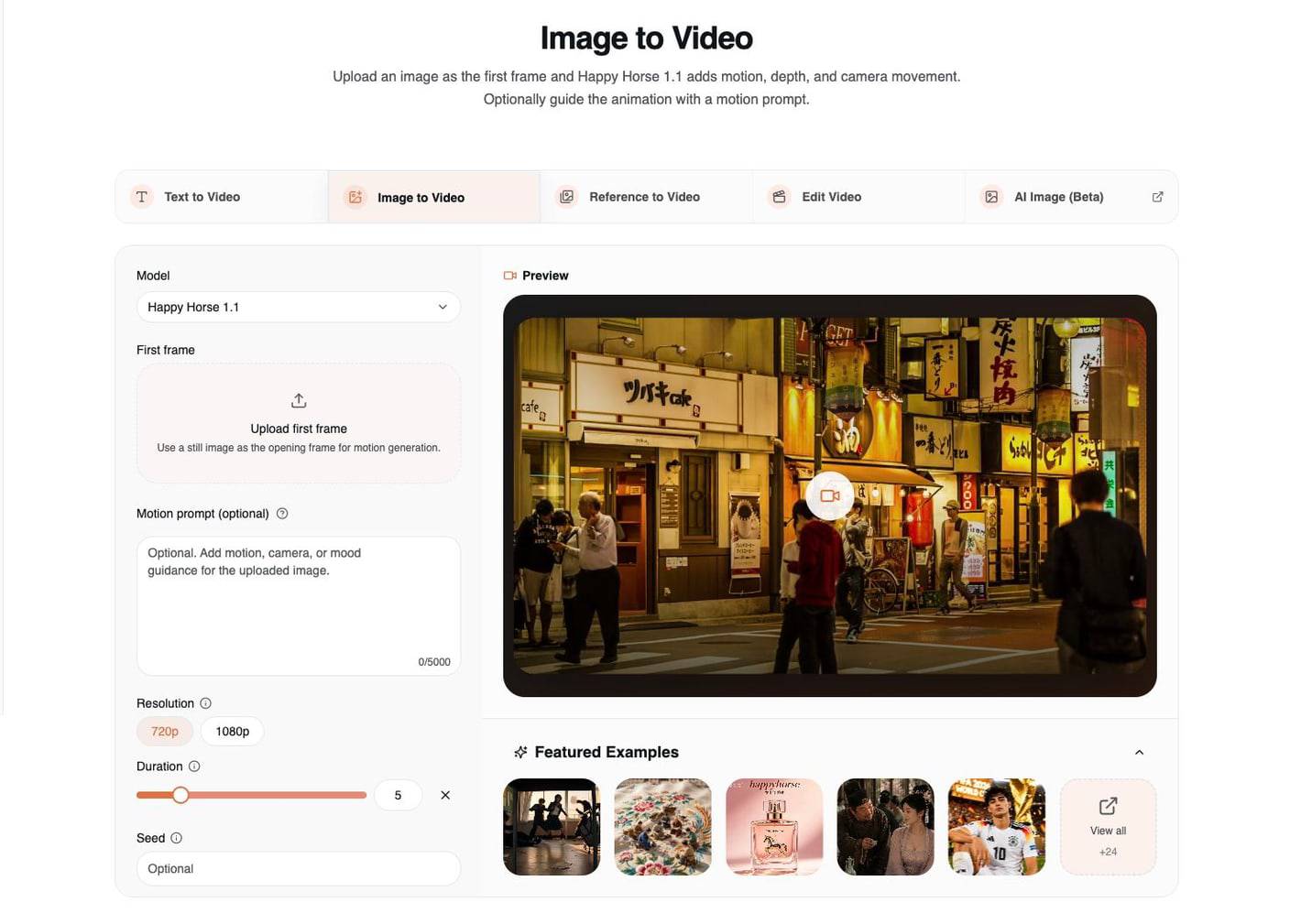
Image-to-video सबसे बेहतर तब काम करता है जब source image में पहले से यह हो:
- एक clear subject
- साफ lighting direction
- readable foreground और background depth
- final video के लिए वही crop जो आप चाहते हैं
- identity या product shape को preserve करने के लिए पर्याप्त detail
practical prompt formula है:
Preserve the uploaded image + add logical motion + add camera movement + protect key details
product image के लिए उदाहरण:
Animate the first-frame perfume bottle with a slow cinematic push-in, soft amber mist drifting around the base, subtle light sweep across the glass, realistic reflections, preserve the bottle shape, label, color, and tabletop composition.
portrait के लिए उदाहरण:
Animate the portrait with subtle blinking, natural breathing, gentle hair movement, and a slow camera drift. Preserve the face, outfit, background composition, and original lighting.
इस mode के लिए upload से पहले crop करें। अगर आपको vertical short चाहिए, तो vertical first frame तैयार करें। अगर आपको widescreen landing page loop चाहिए, तो widescreen first frame तैयार करें। finished composition को radically reframe करने के लिए image-to-video सही जगह नहीं है।
मौजूदा featured I2V examples अलग-अलग source-image jobs के लिए अच्छे references हैं: classroom action scene, detailed craft image, perfume product shot, और ancient tavern-style scene। pattern लगातार एक जैसा है: पहले strong source image, फिर restrained motion।
अध्ययन करने योग्य Image-to-video examples
perfume sample commercial work के लिए दोबारा उपयोग करने का सबसे आसान I2V pattern है: product को preserve करें, atmosphere जोड़ें, फिर camera और light movement से premium feeling बनाएं।
classroom fight sample एक अधिक कठिन I2V case है। यह उपयोगी है क्योंकि prompt अपनी detail budget को cause-and-effect action, environment interaction, और camera synchronization पर खर्च करता है।
इस workflow पर अधिक गहराई से पढ़ने के लिए Happy Horse AI Image to Video: उदाहरणों के साथ पूर्ण गाइड पढ़ें।
3. Reference to Video: Identity और Style को Preserve करें
Reference to Video का उपयोग तब करें जब केवल prompt पर्याप्त न हो। यह mode आपको multiple references upload करने और यह बताने देता है कि वे generated video को कैसे control करें।
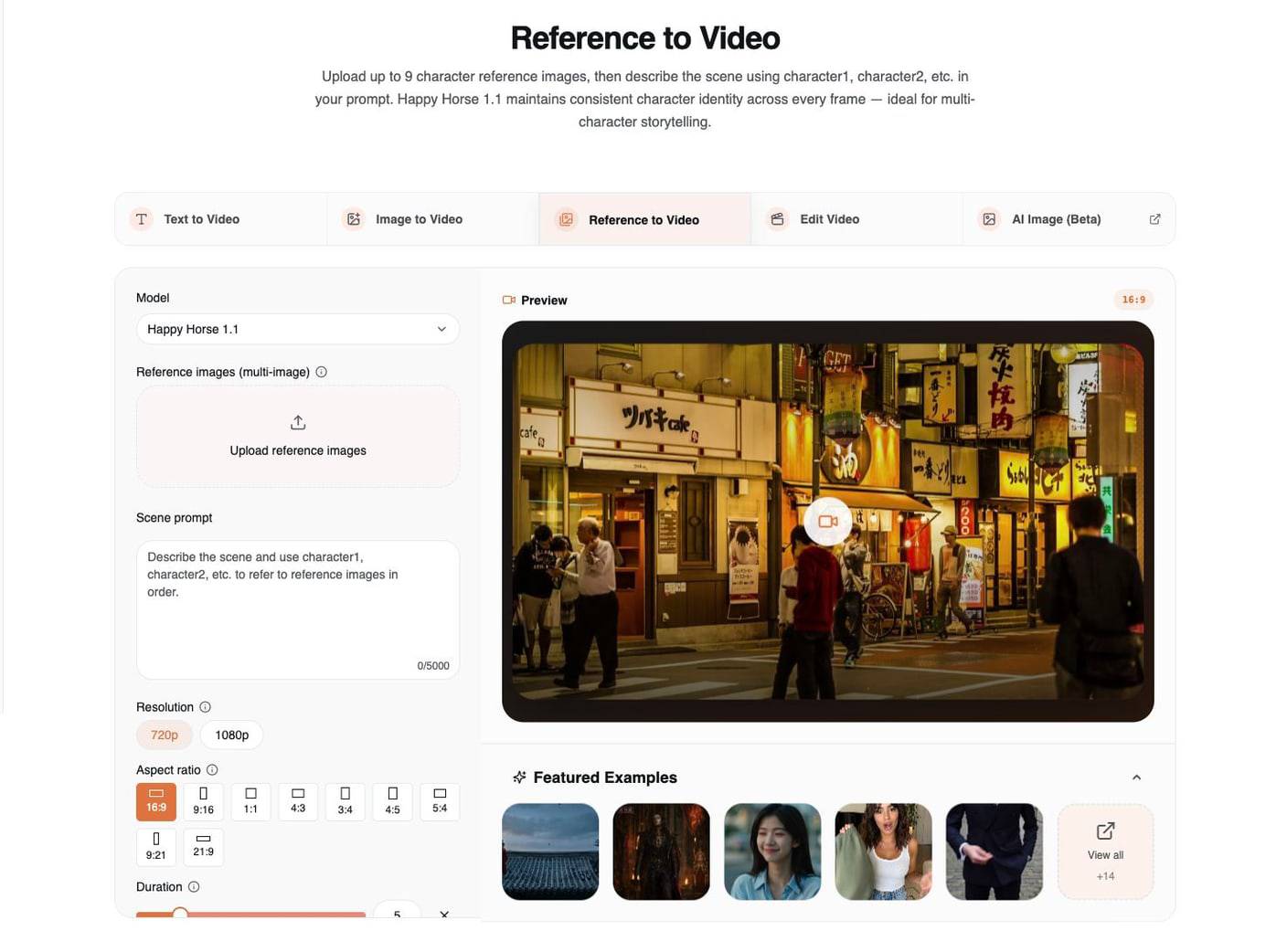
इस workflow में Happy Horse 1.1 अधिकतम 9 reference images को support करता है। महत्वपूर्ण बात सिर्फ images upload करना नहीं है; prompt में उनकी roles को स्पष्ट रूप से नाम देना है।
यह structure उपयोग करें:
Use character1 for [identity/face/outfit].
Use character2 for [second person or creature].
Use image3 for [location/product/style].
Describe the action, camera, lighting, and audio.
उदाहरण:
Use character1 as the swordsman, preserving his face, black robe, and silver hair. Use character2 as the dragon princess, preserving her crown and scale-like shoulder armor. They face each other in a rainy palace courtyard, slow circular camera movement, dramatic lantern light, restrained martial arts motion, cinematic fantasy realism, 16:9.
Reference-to-video सबसे बेहतर है:
- scenes के बीच character consistency के लिए
- multi-character storytelling के लिए
- ऐसे product videos के लिए जहाँ item पहचानने योग्य बना रहना चाहिए
- influencer या presenter concepts के लिए जिनमें outfit और face details स्थिर रहें
- ad campaigns के लिए जहाँ वही visual language दोहराई जानी हो
मौजूदा featured R2V examples सही range को cover करते हैं: martial arts scenes, fantasy character pairing, expression changes, live-shopping presentation, और object-focused prompts। इनका अध्ययन करते समय ध्यान दें कि text reference roles कैसे assign करता है। "use these images" जैसा vague prompt, "use character1 for identity, image2 for outfit, and image3 for product shape" की तुलना में कमजोर होता है।
अध्ययन करने योग्य Reference-to-video examples
martial arts sample एक direct role-mapping example है: image1 और image2 को दो fighters की तरह treat किया गया है, जबकि prompt shared scene और action को define करता है।
live-shopping sample दिखाता है कि fantasy या action से आगे भी R2V क्यों उपयोगी है। prompt references को presenter, outfit, product, और home setting से map करता है, फिर timed speech beats देता है।
ऐसी Settings जो तीनों Pages में महत्वपूर्ण हैं
अधिकांश failed generations का कारण prompt में कोई एक खराब adjective नहीं, बल्कि intent और settings के बीच mismatch होता है।
| Setting | Use it this way |
|---|---|
| Duration | testing के लिए 5 seconds से शुरू करें। जब motion को विकसित होने के लिए समय चाहिए, तब 8-10 seconds का उपयोग करें। 3 seconds में बहुत सारे action beats मत माँगें। |
| Resolution | 720p में iterate करें; जब concept polish करने लायक हो, तब 1080p पर जाएँ। |
| Aspect ratio | text-to-video और reference-to-video के लिए generation से पहले final platform ratio सेट करें। image-to-video के लिए first frame उसी crop में तैयार करें जो आप चाहते हैं। |
| Seed | इसका उपयोग केवल तब करें जब आपके पास explore करने लायक prompt direction हो। यह weak prompt को बचाने से अधिक controlled variation के लिए बेहतर है। |
| Audio | जब dialogue, ambience, music, या action sound scene का हिस्सा हो, तब audio on करें। अगर आपको silent visual loop चाहिए, तो prompt में यह स्पष्ट कहें। |
| Reference images | सभी 9 images upload करने से पहले कम और स्पष्ट references का उपयोग करें। हर reference का एक काम होना चाहिए। |
अगर आप prompts शुरुआत से लिख रहे हैं, तो 50 Happy Horse AI Prompts जो सच में काम करते हैं को companion की तरह खुला रखें। वहाँ के examples पुराने 1.0 patterns हैं, लेकिन prompt structure अब भी 1.1 में अच्छी तरह transfer होता है।
Prompt Templates जिन्हें आप दोबारा उपयोग कर सकते हैं
Text-to-video template
[Subject] is [action] in [environment]. The camera [movement], with [lighting] and [mood]. Include [audio cue]. Keep [style constraint]. Format: [aspect ratio], [duration].
Image-to-video template
Animate the uploaded image with [small motion], [camera movement], and [environmental detail]. Preserve [identity/product shape/composition/lighting]. Avoid changing [protected detail].
Reference-to-video template
Use character1 as [role] and preserve [identity details]. Use image2 as [style/location/product reference]. Create [scene action] with [camera movement], [lighting], and [audio/mood]. Keep all key references consistent.
आम गलतियाँ
गलती 1: fixed identity के लिए text-to-video माँगना।
अगर identity स्थिर रहनी चाहिए, तो इसके बजाय reference-to-video का उपयोग करें।
गलती 2: कमजोर first frame upload करना।
Image-to-video खराब lighting, messy composition, या unclear subject identity को विश्वसनीय रूप से ठीक नहीं कर सकता।
गलती 3: हर reference image का उपयोग सिर्फ इसलिए करना क्योंकि आप कर सकते हैं।
नौ references उपलब्ध हैं, लेकिन अक्सर तीन स्पष्ट references नौ redundant references से बेहतर होते हैं।
गलती 4: target format भूल जाना।
TikTok-style vertical video और YouTube-style widescreen clip की शुरुआत एक ही ratio से नहीं होनी चाहिए।
गलती 5: short durations को overload करना।
5-second clip में पाँच camera moves, तीन emotions, और पूरी action sequence मत माँगें। उस एक पल को चुनें जो सबसे महत्वपूर्ण है।
सुझाई गई शुरुआती Recipes
| Goal | Page | Starting settings | Prompt direction |
|---|---|---|---|
| तेज़ concept scene | Text to Video | 720p, 5s, target ratio | Clear subject, one action, one camera move |
| Social ad product loop | Image to Video | Product image, 1080p final | Preserve product, add mist/light sweep/slow push-in |
| Character story beat | Reference to Video | 2-4 references, 5-8s | Map character1, character2, location/style |
| Dialogue or ambience test | Text or Reference | Audio on, 5-8s | Write the spoken line or sound bed directly |
| Campaign consistency | Reference to Video | Same reference set across attempts | Keep reference roles stable, vary scene action |
FAQ
शुरुआत करने के लिए सबसे अच्छा Happy Horse 1.1 mode कौन-सा है?
अगर आपके पास सिर्फ एक idea है, तो text-to-video से शुरू करें; अगर आपके पास पहले से finished still image है, तो image-to-video से; और अगर identity, product shape, wardrobe, या style consistency महत्वपूर्ण है, तो reference-to-video से शुरू करें।
क्या Happy Horse 1.1 image-to-video को support करता है?
हाँ। Happy Horse 1.1 dedicated Image to Video page पर image-to-video को support करता है। एक first frame upload करें, फिर camera movement और scene motion का वर्णन करने के लिए motion prompt का उपयोग करें।
मैं कितनी reference images उपयोग कर सकता हूँ?
Happy Horse 1.1 reference-to-video workflow अधिकतम 9 reference images को support करता है। prompt में character1, character2, या image3 जैसे clear role labels का उपयोग करें ताकि model समझ सके कि हर reference क्या control करता है।
क्या मुझे 720p या 1080p उपयोग करना चाहिए?
तेज़ prompt testing के लिए 720p का उपयोग करें और जब आप किसी मजबूत direction को polish करने के लिए तैयार हों, तब 1080p का। Resolution कमजोर prompt को ठीक नहीं करता, इसलिए final quality पर अधिक खर्च करने से पहले scene structure पर iterate करें।
क्या Happy Horse 1.1 video edit को replace करता है?
अभी हर workflow के लिए नहीं। Happy Horse 1.1 text-to-video, image-to-video, और reference-to-video के लिए default है। अगर आपको किसी existing video को edit करना है, तो public generator flow में 1.1 edit support आने तक current video-edit workflow का उपयोग करें।
तीनों Happy Horse 1.1 Pages आज़माएँ
सबसे आसान अगला कदम है वह page खोलना जो आपके starting asset से मेल खाता हो:
अगर आप अभी भी यह तय कर रहे हैं कि model में वास्तव में क्या बदला है, तो पहले Happy Horse 1.1 release guide से शुरू करें, फिर यहाँ वापस आकर तीनों workflows को साथ-साथ test करें।