
If you care about turning a still image into believable motion, Happy Horse AI is one of the strongest public options available right now. On the current Artificial Analysis image-to-video leaderboard, HappyHorse-1.0 ranks first in the main no-audio view with an Elo of 1,415. That is the headline reason this workflow matters in 2026: image-to-video is no longer a side feature. It is one of Happy Horse's clearest strengths.
We have been building tryhappyhorseai.com around Happy Horse workflows, including prompt-first generation and reference-image animation. That means this guide is not just a reworded feature page. It is based on the same kinds of portrait, product, and cinematic tests we use when deciding whether a model is actually usable for creators and teams.
The short version is simple: Happy Horse AI image to video works best when the source image already contains clear subject identity, lighting direction, and depth cues. If the reference image is strong, the model is very good at preserving appearance while adding motion. If the reference image is weak, flat, or compositionally messy, no amount of prompting fully rescues it.
The Quick Verdict
Happy Horse AI is currently the best public image-to-video model for general-purpose realism. It leads the main public leaderboard, it handles portraits especially well, and it is strong at turning still product or lifestyle frames into coherent short clips.
That does not mean it wins every image-to-video subcase. The nuance is important:
- on the standard no-audio leaderboard, Happy Horse leads the field
- on the audio-enabled image-to-video view, Seedance 2.0 has a narrow public edge
- in our testing, Happy Horse still felt like the safer overall choice for fidelity and motion realism
So if your workflow starts from a still image and your top priority is believable motion, Happy Horse is still the model we would test first.
What Happy Horse AI Image to Video Is Good At
Image-to-video is one of those categories where many tools look impressive in demos but break down quickly in real use. The typical failure modes are familiar:
- the face stops looking like the source image
- the background shifts too much between frames
- motion feels generic rather than scene-specific
- camera movement is added, but the scene no longer feels anchored to the original still
Happy Horse usually avoids those failures better than most.
In practice, the strongest use cases are:
1. Portrait animation
This is probably the cleanest category for Happy Horse image to video. If the input image already has natural light, good facial visibility, and clear subject framing, the model tends to preserve identity well while adding subtle eye, head, and hair motion.
We have a good internal benchmark for this from the existing library portrait demo in our showcase set. That type of image works because it already gives the model:
- clean subject separation
- soft depth cues in the background
- realistic lighting direction
- a natural target for small facial motion rather than extreme action

If your use case is creator intros, profile visuals, spokesperson loops, or fashion portraits, this is where Happy Horse feels especially strong.
2. Product motion
Still product photography is another strong fit. Bottles, watches, cosmetics, laptops, and plated food all work well when the prompt asks for restrained motion rather than dramatic transformation. Good examples include:
- a perfume bottle with drifting mist
- a coffee mug with rising steam
- a watch face catching light during a slow camera move
- cosmetics packaging opening with minimal hand interaction
The trick is that Happy Horse performs better when the motion grows naturally out of the scene that already exists. Asking a static product image to suddenly become a complex action scene usually weakens fidelity.
3. Cinematic stills
If you start from a cinematic frame, landscape concept art, or carefully composed still scene, Happy Horse is good at adding:
- slow push-ins
- environmental motion
- atmosphere like smoke, fog, rain, or particles
- subtle subject movement that keeps the original composition intact
This is where image-to-video becomes especially useful for trailers, mood videos, and concept presentations.
Benchmarks: Where Happy Horse Stands Right Now
As of April 26, 2026, the Artificial Analysis image-to-video leaderboard is still the best public reference point.
Main image-to-video leaderboard
| Model | I2V Elo | Audio view | Current read |
|---|---|---|---|
| HappyHorse-1.0 | 1,415 | 1,163 | Strongest overall public realism signal |
| Dreamina Seedance 2.0 720p | 1,358 | 1,164 | Slight audio-enabled edge |
| Kling 3.0 | ~1,279 | lower public signal | Better product transparency than raw I2V strength |
The main takeaway is not subtle: on the no-audio image-to-video leaderboard, Happy Horse is clearly ahead.
The only nuance worth highlighting is the audio-enabled subview. There, Seedance 2.0 holds a 1-point public edge over Happy Horse. That matters if your exact workflow depends on audio-aware image animation, but it does not erase the broader story that Happy Horse remains the stronger all-around public I2V performer.
This is why we separate the recommendation like this:
- best general-purpose image-to-video model: Happy Horse 1.0
- best image-to-video model if audio-aware multimodal control is the whole point: closer call, test Seedance too
If you want that narrower comparison, read Happy Horse 1.0 vs Seedance 2.0 after this.
How to Get Better Results from Happy Horse Image to Video
The reference image matters more than the prompt here. For text-to-video, the prompt carries most of the load. For image-to-video, the image is doing half the instruction work before generation even starts.
These are the best practices that held up in our testing:
Start with a clean source image
Your source image should already have:
- one clear subject
- readable lighting direction
- strong focus on the important visual element
- minimal compositional clutter
If the image is flat, overcompressed, or visually noisy, the generated motion usually feels less stable.
If you are generating the source frame rather than starting from an existing photo, Mona Lisa 1 is an upcoming AI image model worth following. It is still in blind testing rather than broadly released, but its focus on photorealistic portraits and product shots is directly relevant to creating cleaner first frames for image-to-video workflows.
Ask for motion that fits the image
This is one of the easiest mistakes to make. If the image shows a seated portrait, ask for subtle head movement, blinking, breathing, and shallow camera drift. If it shows a bottle on a reflective table, ask for mist, light sweep, and slow rotation. If it shows a fantasy landscape, ask for fog, clouds, particles, and a gentle push-in.
The closer the motion request fits the original visual logic, the more believable the result tends to be.
Use camera language sparingly
For image-to-video, less is often more. A still image already sets composition. If you overload the prompt with dramatic camera commands, the model may over-correct and drift away from the source frame.
In most successful runs, prompts like these worked better:
subtle push-inslow cinematic driftgentle head movementlight wind in hairmist rising
These worked worse:
rapid orbit shotextreme dolly zoomviolent action burstfast handheld whip pan
Add environmental motion before body motion
If you need to choose where to spend your motion budget, start with the scene. Hair sway, steam, fog, cloth, reflections, and particles often make a clip feel alive more reliably than ambitious full-body movement from a static input.
That is especially true for commercial or editorial use cases, where subtle movement usually looks more premium than exaggerated motion.
Example Workflows That Actually Make Sense
Here are three image-to-video workflows we think are genuinely useful rather than just demo-friendly.
Portrait-to-video loop
Input:
- a clean portrait with soft background depth
Prompt direction:
- subtle blink
- natural head shift
- light hair movement
- slow cinematic push-in
Best for:
- creator bios
- waitlist pages
- landing page hero loops
- personal brand intros
Product still to ad motion
Input:
- well-lit product photo on a clean surface
Prompt direction:
- drifting steam, mist, or dust
- soft reflective change
- slow rotation or camera move
- premium studio lighting continuity
Best for:
- beauty brands
- coffee and food content
- DTC product pages
- social promo loops
Concept art to cinematic scene
Input:
- a strong still with layered depth and atmosphere
Prompt direction:
- cloud or fog movement
- gentle dolly-in
- small environmental animation
- particles, light rays, or water motion
Best for:
- trailers
- visual development
- game pitch decks
- creative treatment videos
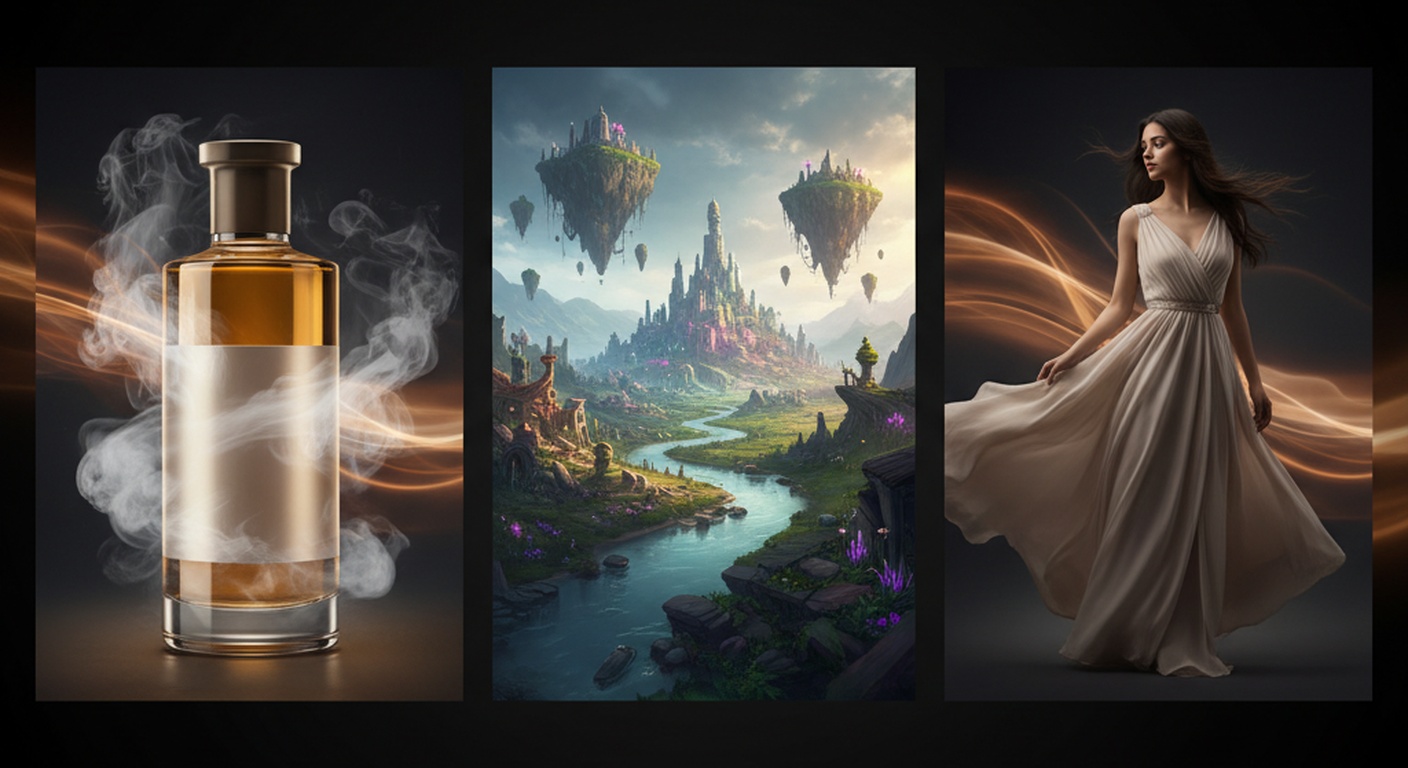
These are the kinds of cases where image-to-video delivers real leverage. You are not replacing full video production. You are upgrading a still asset into motion without starting from zero.
How Happy Horse Compares to Text-to-Video for This Job
A common mistake is choosing text-to-video when image-to-video would actually be more controllable.
Use image-to-video when:
- you already have the exact character look
- brand/product fidelity matters
- composition must stay close to a reference
- the goal is motion enhancement, not scene invention
Use text-to-video when:
- you need the scene invented from scratch
- you are exploring broad directions quickly
- identity consistency is less important than concept discovery
- the motion itself is more important than preserving a source frame
That distinction matters because a lot of creators blame the model when the real problem is choosing the wrong mode.
If you are still learning how to steer the model from scratch, 50 Happy Horse AI Prompts That Actually Work is the best companion piece to this article.
Should You Use Happy Horse AI Image to Video?
Choose it if:
- you want the strongest public image-to-video benchmark leader
- you work from portraits, products, or cinematic stills
- you care about realism more than stylization
- you want one model that can also handle text-to-video and native audio workflows
Be more cautious if:
- your whole workflow depends on audio-enabled image animation and multimodal control
- you need a fully self-serve public API today
- your reference images are weak, noisy, or compositionally confused
Our recommendation
For most creators, agencies, and product teams, Happy Horse AI is the best image-to-video model to start with right now.
It leads the main public benchmark. It behaves well on portrait and product references. And it gives you a practical bridge between still assets and short cinematic clips without forcing a full video production workflow.
If you want to start generating now, use this image-to-video AI tool — it's live and open to everyone. If you want the broader model overview first, read What Is Happy Horse AI? next.
FAQ
What is Happy Horse AI image to video?
Happy Horse AI image to video is the model's workflow for turning a still reference image into a short animated clip while preserving the subject, lighting, and overall composition of the original image.
Is Happy Horse the best image-to-video model?
On the current public Artificial Analysis no-audio image-to-video leaderboard, yes. HappyHorse-1.0 ranks first with an Elo of 1,415 as of April 26, 2026.
Is Happy Horse better than Seedance for image to video?
Overall, yes on the main no-audio leaderboard. Seedance 2.0 has a narrow public edge on the audio-enabled image-to-video subview, so that specific workflow is more competitive.
What kinds of images work best?
Clear portraits, product stills, and cinematic scenes with good lighting and depth cues work best. Messy, flat, or low-quality images usually produce weaker motion.
Is image-to-video better than text-to-video?
Not always. Image-to-video is better when fidelity to a specific source frame matters. Text-to-video is better when you need the model to invent the scene from scratch.
Recommended Reading
- What Is Happy Horse AI? The #1 Ranked AI Video Generator Explained
- Happy Horse 1.0 vs Seedance 2.0: Which Video Model Wins?
- Happy Horse 1.0 vs Kling 3.0: Which Video Model Wins?
- 50 Happy Horse AI Prompts That Actually Work